How do I verify a document manually?
Updated 2026-03-29
At TRUE, every document we issue is secured with a unique digital fingerprint, created by encrypting its metadata and storing it on the blockchain. This process ensures that any third-party verifier can confirm the document's authenticity without compromising privacy. While we used to display this blockchain data openly, we found that it often led to an overload of technical inquiries, so we have streamlined the process to focus on providing secure, verifiable documents with less distraction.
Verify documents manually
Example URL:
Document Hash:
08251fdc60ff88b61fc7c2747b3250
ID:
29779
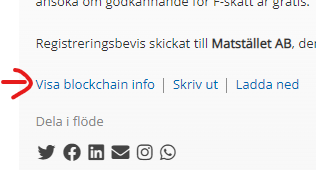
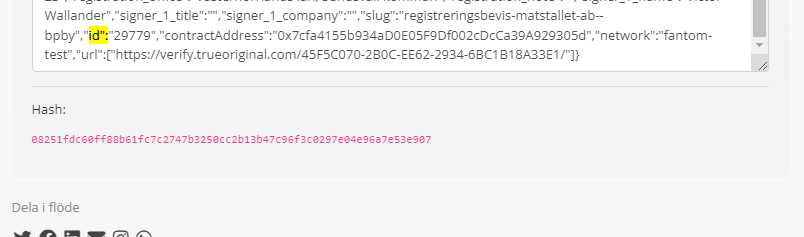
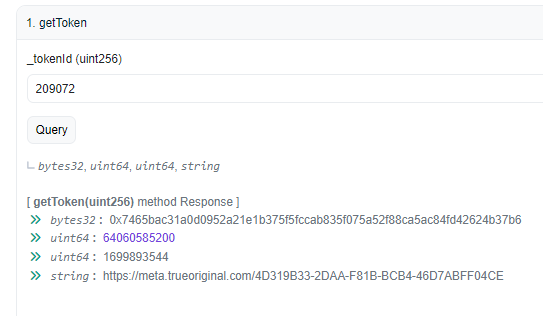
1. Go to smart contract address for this document:
2. Click on getCert and enter document ID 29779.
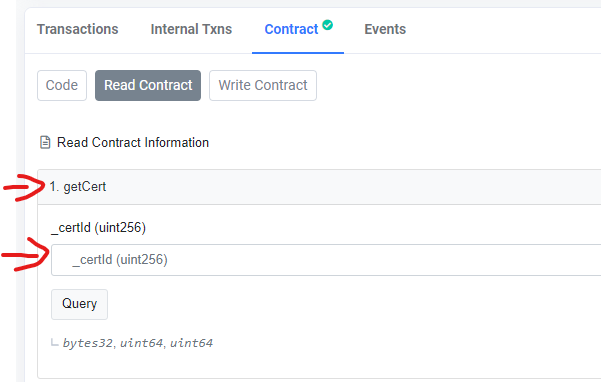
3. Then click on "Query" to get the document hash stored in the smart contract.
Compare the hash with the result from the smart contract. 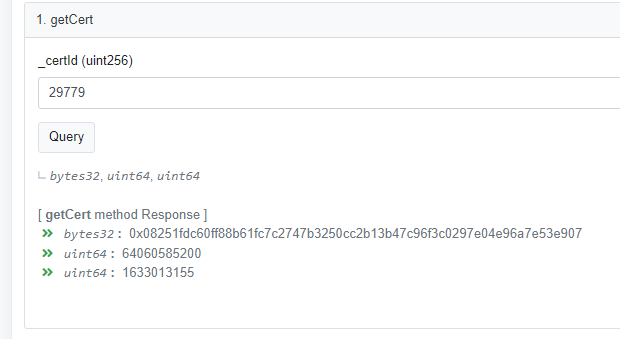
** With the new polygon contract you also get the link to the document.
Verify documents automatically with a javascript.
To verify the document automatically you only need the document metadata. This can be found under blockchain information on the document page.
To verify a document go to this example page and paste the document metadata.
https://docs.truecrt.com/verify-demo.html
If you want to host your own verify website you can copy this html code and host it on your webserver.
To connect to the blockchain you need to use web3 and our javascript library:
Web3.js:
https://cdn.jsdelivr.net/gh/ethereum/[email protected]/dist/web3.min.js
TRUE Public:
https://cdn.truecrt.com/script/true.web3.public.js?v=1.0.12
The function to verify a document we use verifyDocument():verifyDocument(id,meta,network,contractAddress);
<html>
<head>
	<meta name="viewport" content="width=device-width, initial-scale=0.75 user-scalable=0">
	<link rel="stylesheet" href="https://cdn.jsdelivr.net/npm/[email protected]/dist/css/bootstrap.min.css" integrity="sha384-F3w7mX95PdgyTmZZMECAngseQB83DfGTowi0iMjiWaeVhAn4FJkqJByhZMI3AhiU" crossorigin="anonymous">
	<script src="https://cdn.jsdelivr.net/gh/ethereum/[email protected]/dist/web3.min.js"></script>
	<script src="https://cdn.truecrt.com/script/true.web3.public.js?v=1.2.8"></script>
</head>
<body>
<section>
	<div>
		<center><h3>Verify TRUE Documents</h3></center>
		<hr>
	</div>
	<div>
		<input type="text" id="document-id" placeholder="Document ID" class="form-control">
	</div>
	<div>
		<input type="text" id="contractAddress" placeholder="Document Contact Address" class="form-control">
	</div>

	<div>

		<textarea id="meta" rows="10" placeholder="Document Meta:" class="form-control"></textarea>
	</div>
	<button class="btn btn-secondary" id="verify" style="margin: 10px;">Verfiy</button>
	<div id="result" class="result">
		 Results
	</div>
	<div class="result">
		<pre id="json-result">Json object</pre>
	</div>
</section>
	<script type="text/javascript">
		async function verifyDocumentForm(){
			var id = document.getElementById("document-id").value;
			var network = "";
			var contractAddress = document.getElementById("contractAddress").value;
			var meta = JSON.stringify(JSON.parse(document.getElementById("meta").value));
			console.log(meta);
			document.getElementById("json-result").innerHTML = JSON.stringify(JSON.parse(meta), null, 2);

			verifyDocument(id,meta,network,contractAddress).then(function(result){
				document.getElementById("result").innerHTML = result;
			});

		}
	</script>

	<style type="text/css">

		body {
			display: flex;
			justify-content: center;
			align-items: center;
		}
		section {
			display: block;
			width: 100%;
			max-width: 700px;

		}
		input,textarea,select,button{
			width: 100%;


		}
		div {
			margin: 10px;
			width: 100%;

		}
		.result {
			margin: 10px;
			padding:10px;
			background: #e6e6e6;
			text-align: left;
		}
	</style>
</body>
</html>
Still need help?
Our support team answers questions this article does not.
Contact support